Fourth Class: Dry Media Continued
Warmups!
- Set tracking
- Three One Minutes
- First one:
- Use New File, 1200px x 1200 150ppi, white paper
- Set brush color to black
- Use Charcoal: Soft Vine Charcoal 20
- Second & Third one:
- Use New File, 1200px x 1500px 150ppi, gray paper
- Set color to something light and warm
- Use Pastels: Artist Pastel Chalk
- Switch at 30 seconds to a dark cool color
- One Five Minute
Two Color Conté Crayon

1500x1200 Pitcher to Clone (right click to download)
- Open the jpg
- Grab color with the eyedropper the midtone, highlight, and dark colors and store them in a color set:

Open or bring to font Color Set panel
For easier use, set the panel to large icons. Panel menu > 
Panel menu > New Color Set
Name it "My Color Set"
Capture midtone, hightlight, and dark colors with eyedropper and click "Add color to color set" button for each. You may have to scroll down to see it.- Save color set with panel menu > Export Color Set
- The color set will be saved as a text file. To import it back in later, you have to:
- Panel menu > Import Color Set
- Choose "Text Files" from the popup menu in the file dialog

Write down the RGB values of the midtone (175, 168, 142)
HSV doesn't work because the paper color UI doesn't use the same numbering system- Open new painter file, 640 x480 150ppi
This is smaller than the image we will clone from, but the pitcher automatically resize to fit

Set paper color to captured midtone R=175, G=168, B=142- Click OK to create the canvas
- Open the Clone Source Panel
- Use Menu > File > Quick Clone to create a clone
- Choose Charcoal & Conté: Real Soft Conté variant
- Set brush size to around 8

Work up darks
Work up lights- Use Blender: Soft Blender Stump
- Come back in at the end to make spectral highlights with white
Charcoal
One of the oldest art-making media
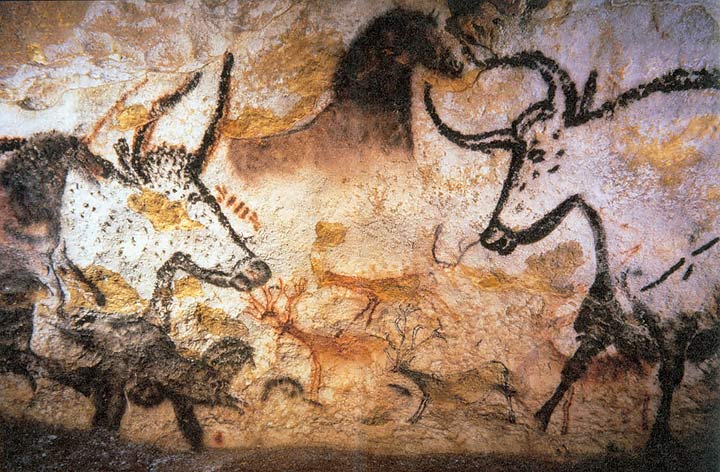
- Created by baking wood in a low-oxygen kiln
- Favorite of Renaissance artists
- Great for creating images with contrasting light and dark areas used to define dimensionality (like roundness) (aka chiaroscuro)
- Still life
- Life Drawing
- Portraiture
- Blends easily with fingers, tissue or torillion (aka blending stump, or stomper)

Real-world Charcoal

- Comes in different forms:
- Comes in different hardnesses
Painter's Charcoal

Brush Category: Charcoal
Brush Variant: Charcoal
Brush Size: 15px
Paper: Basic Paper
- Variants:
- Charcoal Pencil
- Charcoal (a typical Painter distinction without a difference)
- Dull Charcoal Pencil 3,5,7

- Gritty Charcoal

- Hard Charcoal Pencil 3,5,7

- Hard Charcoal Stick 10, 20, 30

- Sharp Charcoal Pencil 3,5,7

- Soft Charcoal

- Soft Charcoal Pencil

- Soft Vine Charcoal

Blending

Painter Blender brushes
Painter sample file
- 27 variations (in Painter 12)
- Most are useless
- Seven add pigment (although there is no way to tell from the name)

- Blender Bristle
- Blender Brush
- Mixer Thin Flat
- Real Blender Flat
- Real Blender Round
- Soft Blender Brush
- Wet Oily Blender
- The most useful ones:
- Detail Blender

- Real Pointy Blender

- Round Blender Brush

- Smudge

Optimal Settings for Charcoal
- Use a rough paper surface, like Charcoal Paper
- Use Hard Charcoal variant
- Blend with the Smudge variant of Blenders
- For smoother results with less texture, try Just Add Water variant of blenders

Pastels
- A kind of colored chalk. Basically powdered pigment in a gum and water binder
- A stick of Pastel is called a "Crayon"
- Works almost like paint, as opposed to drawing
- A favorite of Edgar Degas
- em>Very brittle — don't drop them!
- Simultaneously yield tone, line and color
- Work really well on colored paper
Real-world Pastels

Comes in a variety of types:
- Soft Pastels:
- Most common variety
- Come in stick/crayon form
- Mostly pigment with a little binder
- Velvety in feel
- Hard Pastels:
- Less pigment and more binder
- Not as brilliant/intense as Soft Pastels
- Can be sharpened to a point
- Water-Soluble Pastels
- Can be worked with a wet brush
- Caran d'Arche Neocolor
- Relatively new
- Pastel Pencils
- Harder than Soft stick variety
- Good for working small details
- Oil Pastels
- Buttery
- Won't smudge easily
- Kind of like oil paint
Painter's Pastels

Brush Category: Pastel
Brush Varient: Soft Pastel
Brush Size: 15px
Paper: Rough Charcoal Paper
- Use any of these brush categories to emulate pastels:
- Pastel
- Variety of shapes and hardnesses
- Chalk
- Almost identical to Pastel
- Oil Pastels
- A bit more buttery and less textured than Pastel and Chalk
- Works best on colored paper
Step by Step Blending and Feathering with Pastels
Set up a still-life with an object

- Start with a sketch on colored paper
- Create new file: Menu > File > New
- Set paper color with the little Paper Color rectangle
- Set paper texture from the toolbox to Sandy Pastel Paper texture
- Pick a color from the color palette (like warm yellow)
- Select Brush Category: Pastel, Brush Variant: Square X-Soft Pastel 20
- Roughly sculpt the shape of your object, suggest an horizon line, rough in the background, choosing new colors as needed
- Blocking in color over the sketch
- Using the Square X-Soft Pastel, lay in more color
- Strokes should follow the direction of the form
- Choose Artist Pastel Chalk Variant to add more color and value to the sketch
- Smear existing paint as you add new color with Oil Pastels: Soft Oil Pastel
- Also use Grainy Water Blender to selectively blend areas
- Add neutral colors to the background
- Soften the brush work
- Use Grainy Water Variant and Smudge blenders
- Follow direction of the form
- Adding feathered strokes and detail
- Use Tapered Pastel 10 variant
- Stroke in the direction of the form
- Use Grainy Water blender to soften feathering in shadow areas
- For really fine details, use the Soft Pastel Pencil
My Apple zipped .rif's
Pen & Ink
- Use the Fine Point variant of Pens
- Choose 100% black
- Use Smooth Ink pen for thick/thin lines
- Use Nervous Pen for a sense of spontaneous energy
Pen Variants


