Animate Googly Eyes
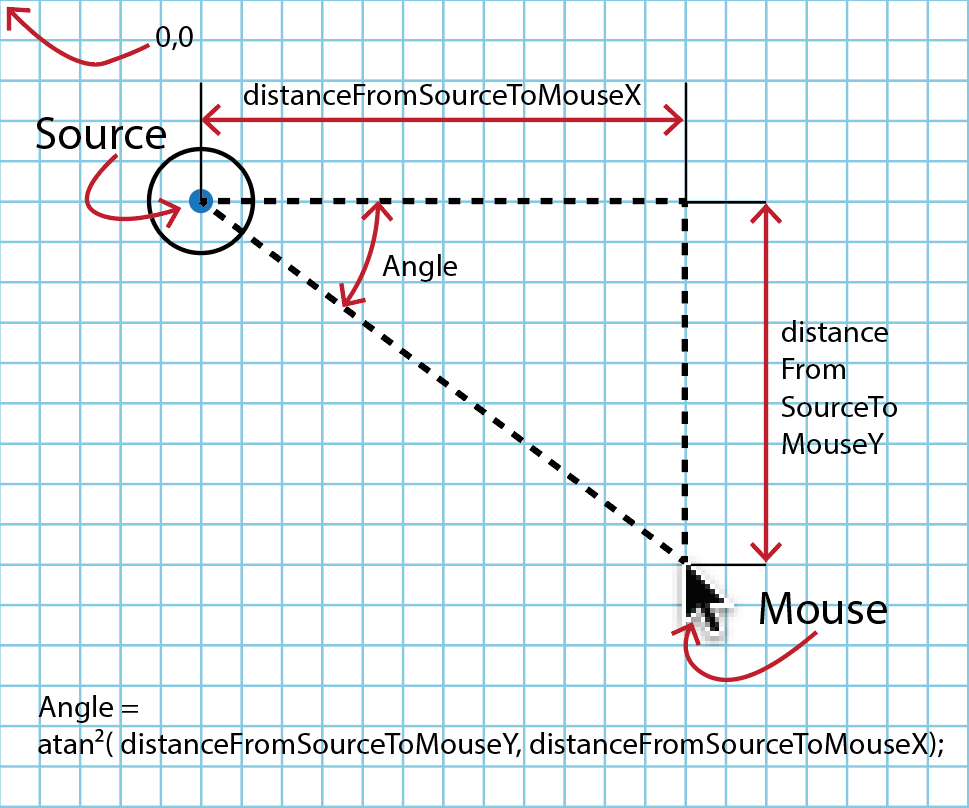
To get the eyes to follow the mouse as it does in this example, you have to resort to trigonometry (yikes!). Luckily Processing has built-in trig functions that are perfect for figuring out the angle (in radians, of course) from any one point to another. All you have to know is the length of the two sides of the right-triangle formed by the x/y coordinates in the window. Namely, the atan2( ), known as the "arc tangent two" - arc tangent being a trig function like sine, arcsine, cosine, arcosine, tangent, and arctangent (more here). Once you know the angle, you can use rotate() to turn the eyes toward their target, the mouse. Since it's already in radians, you can feed the value directly into the rotate() function.
In it's basic form, it works like this:
atan2( distanceFromSourceToMouseY, distanceFromSourceToMouseX )
Our trick is getting the distance from the eye to the mouseX and mouseY. A little simple arithmatic will give us that, namely:
atan2( mouseYLocation - eyeYLocation, mouseXLocation - eyeXLocation )
That formulation happens to work correctly with Processing's rotate(), giving negative values when it needs to. So if the eye is at 50,50 and the mouse is at 170,140, then its:
atan2( 140 - 50, 170 - 50 );
// or
atan2( 90, 120);
Which is 0.6435011 in radians, and that converts to about 37 degrees. If you look at the diagram above, which has those coordinates, the angle is indeed about 37 degrees
PROCESSING
Googly Eyes
// Googly Eyes
// v1.0
//
// Global Variables
int robotWidth = 100;
int robotHeight = 100;
float newX = 0.0;
float newY = 0.0;
float speed = 0.5;

void setup() {
  size(500,500);
  surface.setLocation(800, 600);
}

void draw() {
  background(204);
  if (newX > width + (robotWidth/2)) { // Wrap
     newX = -robotWidth/2;
     newY = -robotHeight/2;
  }
  // Move robot
  newX += speed;
  newY += speed;
  translate(newX,newY);
  // Draw robot
  drawRobot();
}

void drawRobot() {
  fill(255);
  ellipse(0,0,100,100); // Head
  // Isolate eyeball translate and rotate
  // Right eye
  pushMatrix();
    translate(-12,0);
    // atan2 on distance between mouseY and newY
    // and between mouseX and newX offset by 12
    rotate((atan2(mouseY-newY,mouseX-newX+12)));
    drawEye();
  popMatrix();
  // Isolate eyeball translate and rotate
  // Left Eye
  pushMatrix();
    translate(12,0);
    rotate((atan2(mouseY-newY,mouseX-newX-12)));
    drawEye();
  popMatrix();
}

void drawEye() {
   fill(255);
   ellipse(0,0,20,20); // Eyeball
   fill(64,64,255);
   ellipse(5,0,6,6);   // Irises at 0°
}
A Variation: Laser Canon
Using the same gizmo, atan2(), we can control a cannon to follow the mouse with a red line, like a lazer cannon!
PROCESSING
Laser Canon
// Laser Cannon
// v1.0
//
// Global Variables
int robotWidth = 100;
int robotHeight = 100;
float newX = 0.0;
float newY = 0.0;
float speed = 0.5;
boolean fire = false;

void setup() {
  size(500,500);
}

void draw() {
  background(204);
  if (newX > width + (robotWidth/2)) {
     newX = -robotWidth/2;
     newY = -robotHeight/2;
  }
  newX += speed;
  newY += speed;
  println(newX);
  translate(newX,newY);
  drawRobot();
}

void drawRobot() {
  ellipse(0,50,100,100); // base
  // Pull the laserbeam out of the translate() in the
  // draw loop by subracting the same amount as the
  // translate function adds in the draw loop
  translate(-newX,-newY);
  if (fire) {
    stroke(255,0,0);
    line(newX,newY,mouseX,mouseY);
    stroke(0);
  }
  // Put the draw loop translate() back in again
  translate(newX,newY);
  pushMatrix();
    // atan2 on distance between mouseY and newY
    // and between mouseX and newX
    rotate((atan2(mouseY-newY,mouseX-newX)));
    drawCannon();
  popMatrix();

}

void drawCannon() {
   strokeWeight(10);
   line(0,0,40,0);     // Barrel at 0°
   strokeWeight(1);
   ellipse(0,0,30,30); // Turret
}

void mousePressed() {
  fire = true;
}

void mouseReleased() {
  fire = false;
}